
I’ve owned the Allen and Heath SQ-5 and just upgraded to the SQ5+ mixer and added it to my kit list. Here’s my opinion on the differences and the upgrade experience.
At time of writing (Aug 2026), the SQ-5 is at firmware 1.61 and the SQ5+ is at firmware 2.0.3.
Video
Pictures
The SQ-5 and the SQ5+ by day
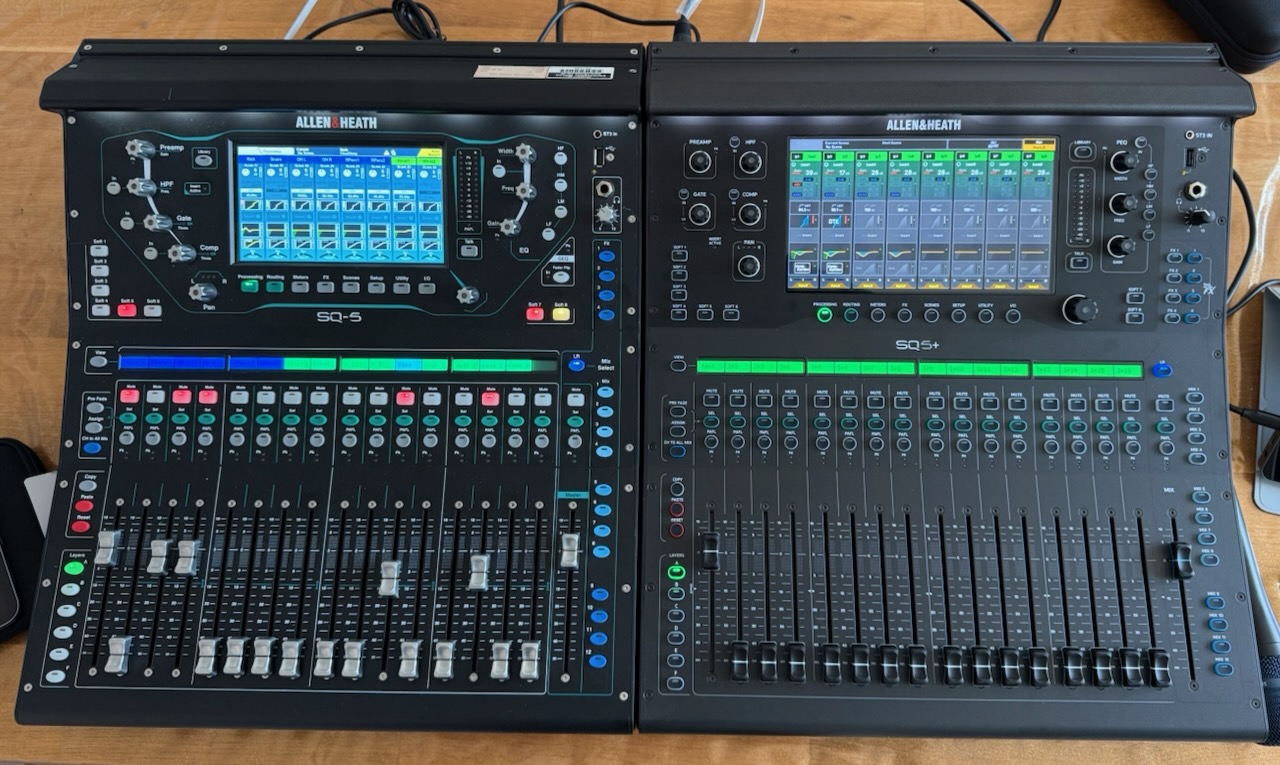
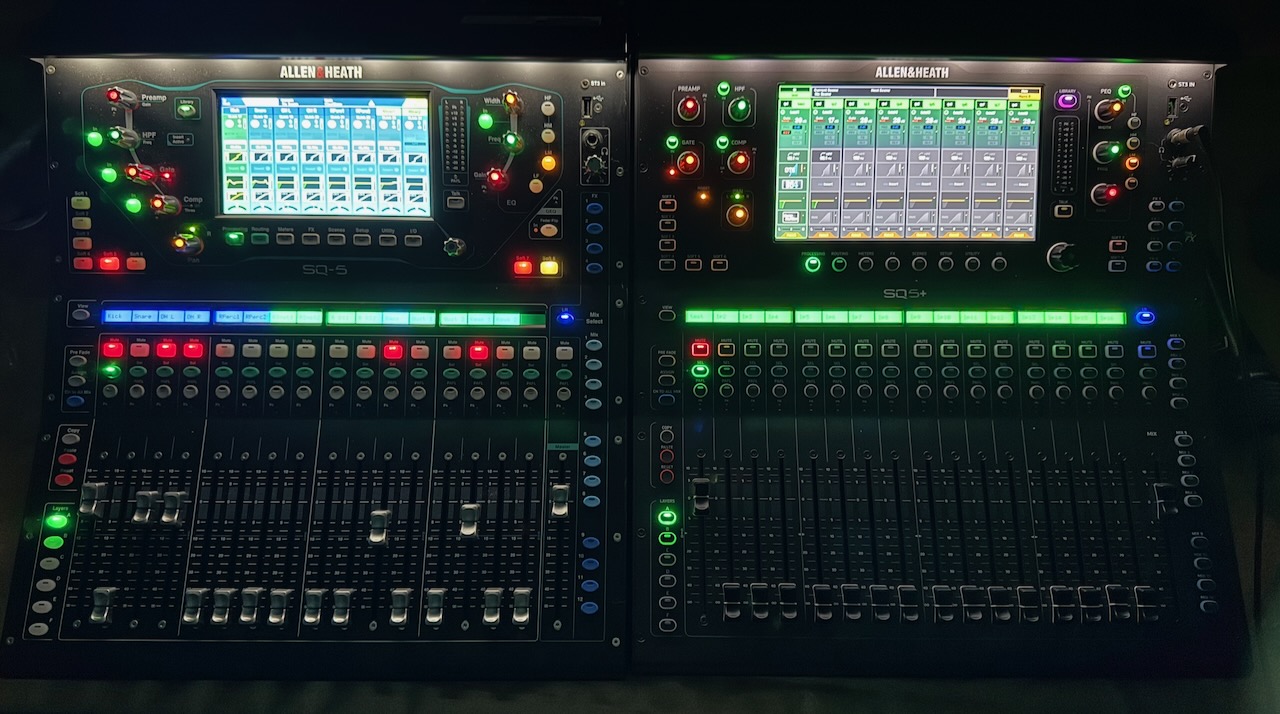
The Benefits and Disadvantages of the Allen & Heath SQ5+
This is my perspective, vs. the original SQ-5, so other people will have different opinions.
Other SQ models: Most of these comments will apply equally to all the original SQ series versus the SQ Plus series, since soft rotaries, fader count and onboard analogue I/O are the model differences between the SQ-5/6/7 and the SQ5/6/7+, whereas all differences I discuss will apply to the all of these models regardless of whether it’s a 5, 6 or 7.
Benefits of Upgrading
- Improved screen size
- Improved on-screen UI
- More modern flat UI design with a grey/black background
- Better use of channel colour and names across the UI
- Better on/enable buttons
- Filters on channel selectors replace some very long unfiltered selectors
- Helpful +1 button on strip assign (shame it doesn’t appear in the I/O patch area)
- Better I/O patching with an arrow helping you decode what you’re doing
- New visible count of connected Wi-Fi devices
- Improved copy/paste hinting
- Faster screen refresh rate which makes scrolling easier
- Increased power to run newer DEEP FX in the channels
- Higher quality RackUltra FX (if paid for – it cost me c. £137 inc VAT to get the RackUltra essentials bundle, which I like)
- Smarter grey/black paintwork and controls
- Limited-time promotion giving all the RackExtra FX and DEEP plugins (the SQ+ PlusPack) for free when registering and signing up to the newsletter. Some notable inclusions:
- A big stack of compressors, familiar from every previous A&H digital mixer (DEEP plugins)
- Compstortion, which seems to be an homage to the Empirical Labs Distressor (DEEP plugin, plus series only)
- A dual-threshold expander (DEEP plugin, plus series only)
- Multi band compressors (RackExtra FX)
- Dynamic EQ (RackExtra FX)
- No loud noises from the onboard analogue outputs on power up/down (this was a bugbear of mine on the SQ-5).
Disadvantages/Limits
Not many.
- It’s more expensive than the original SQ
- No RackUltra FX unless you buy them
- The tube preamp model is not included in the SQ+ PlusPack (today on its own it costs as much as the RackUltra essentials bundle, for some reason).
- Slightly more complicated to use having Extra and Ultra FX on board. Ultra effects engines can run Extra or Ultra FX.
- Compressor and gate DEEP models don’t have a dynamic thumbnail of the settings in the overview screen, just metering and an icon
- DEEP multi-band compressors and dynamic EQs could benefit from some UI modernisation.
- 17 seconds to a responsive touch UI (vs 11 seconds on the SQ-5)
What’s the same between the SQ-5 and the SQ5+?
A lot.
- 96kHz FPGA Processing, sub 0.7ms latency
- 48 Input Channels
- DEEP Processing Ready (although the SQ5+ can run newer models that the SQ-5 can’t)
- 8 RackExtra FX Engines + 4 dedicated send and 8 returns (the RackUltra FX have their own extra buses)
- 12 Stereo Mixes + LR
- 3 Stereo Matrix (convertible to up to 6 mono)
- Intelligent 128×128 SLink port
- Compatibility with stage boxes
- 64×64 I/O Port (Dante, extra SLink etc.)
- 32×32 USB Audio Interface
- Six-character scribble strips
- Preamps are largely the same
- The size and shape
- The analogue I/O connections
- The USB A and B connections (no USB-C here)
- The general workflow
- iPad and Mac and PC apps that closely resemble each desk’s own UI
- 19 seconds from power-on to passing audio
Links
- Allen & Heath’s main SQ product page
- SQ+ RackUltra FX you can buy
- Guitar Center video with Keith Johnson doing demos on the RackUltra FX (full expensive versions – impressive stuff)
Video Transcript
Here’s a transcript of my video above, which covers much (but definitely not all) of the same ground.
My Situation / Background
Here’s a video showing the differences between the SQ5 and the SQ5 Plus mixers from Allen & Heath. I’ve had the SQ5 on the left since 2019, and the SQ5 Plus on the right arrived yesterday. I’ve been experimenting with the two and comparing them.
Originally I had the Qu-16. Then I replaced that with the GLD-80, and then the SQ5 replaced that. I couldn’t find many side-by-side comparisons, so I thought it would be useful to do this for people considering upgrading from one platform to the other, or migrating between them for work reasons.
My usage scenario: I do function bands for things like weddings, and quite a lot of festival-style work — fairly small, local stuff, but with a lot of quick changes and very fast setups and turnarounds. I don’t do touring with a single band — I’d like to do that someday, but it’s not my main use case.
The Physical Layouts
Starting around the back of these mixers — if you know the SQ5 well, you’ll be familiar with this back panel, and moving on to the SQ5 Plus, it’s as good as identical. Really, it’s only the paint and the labelling that’s changed; the inputs and outputs are exactly the same.
General Differences and Similarities
One slightly surprising thing is that the SQ5 Plus takes a little longer to boot — just a few seconds, but noticeably more time to become responsive. Nothing troublesome, but a bit surprising for a machine that should be more powerful.
One improvement is that the SQ5 Plus firmware can be updated via the iPad app — something I first saw on the CQ mixer. It’s much more convenient than messing around with USB sticks. The SQ5 is USB-stick-update only, which the SQ5 Plus can also do.
I’ve taken some night photos for my blog post (link included), and both mixers look great — the lighting is very similar. In fact, a lot is very similar between the two.
The soft keys mirror each other between the two desks, as does the cluster of silver knobs — just rearranged slightly. The library key has moved to the other side of the desk, and the fader-flip key is the only control missing dedicated hardware on the SQ5 Plus — it can be reassigned to a soft key, but no longer has its own button.
All the other controls and bus layouts are the same, apart from the effects buses: four dedicated effects buses on the SQ5, versus 4+4 on the SQ5 Plus (Rack Extra and Rack Ultra effects). So it’s quick and easy to move from one desk to the other — just slightly different layouts, including the EQ knobs, but fundamentally very similar.
The screen on the Plus, apart from being bigger, is now flush with the top, whereas on the SQ5 it’s recessed. Not a huge thing, but I prefer it flush. The channel strips look very similar too, though again recessed on the original — I think they’re similarly recessed on the Plus, just covered with a flush piece of perspex.
The screen is a little more responsive on the Plus. Hard to say by how much, but some of the drag-and-drop functions are a bit easier, and some actions just need a gentler touch — a bit more pleasing overall.
Front Controls: Similarities and Differences
The dark UI is clearer on the Plus. On the SQ5’s multi-channel screen, it’s quite busy and hard to see what the meters are doing. On the SQ5 Plus, once the meters are triggered, they’re much easier to read, and zooming in shows compressor activity more clearly. There’s simply a lot more real estate on the bigger screen for showing detail — the overview screen in particular is much better.
Screens Comparison
On the meters screen, the SQ5 shows a decent number of meters but requires scrolling. On the SQ5 Plus, you can see a lot more together, and you can also see compression activity on both. (Correction: the meters screen doesn’t have its own custom layers, but it can follow the custom fader layers.)
Meters Screen
(See note above — meters screen behaviour on the Plus follows custom fader layers rather than having separate custom layers of its own.)
Layers Changes Due to Extra Buses
On the SQ5, when you reset the desk, custom layer F is always available for whatever you want to use it for. On the SQ5 Plus, because of the extra Rack Ultra effects buses, layer D is busier by default, and layer F — which used to be empty on reset — now carries the DCAs, masters, and matrices. So the desk is a bit busier out of the box, and you’ll need to take over a different layer to build your own custom layers.
Channel count and processing are otherwise very similar — both are still 48-channel desks with the same standard 12 buses. The SQ5 Plus simply doubles the number of effects buses, and each effects unit gets its own dedicated return.
Faders and Knobs, and Desk Sizing
The faders and knobs feel much the same. Some knobs are slightly different — a bit bigger on what Yamaha would call a “touch and turn” — but nothing significant. The faders have the same feel and reach, and the desks are identically sized side by side — the flight case for one will fit the other, as they’re built on an identical chassis.
Copy and Paste Hinting
On the SQ5, pressing Copy just readies the function without showing what you can do next. On the SQ5 Plus, pressing Copy — similar to the CQ mixer — immediately shows what can be copied, and once copied, where it can be pasted. Reset works the same way, showing options when the key is held down; tapping a location performs that action. It makes the whole process a bit easier.
Desk Reset Function
One small thing I like: on the SQ5, the ability to do a desk reset from the Scenes area had been lost — you had to go into a different menu. The SQ5 Plus brings that reset option back into the Scenes area, which is nicer — a small return to how things used to be, done in a better way.
User Interface Styling Updates
On the SQ5, EQ controls (for example) have a mock button-style label — functional, but feels a bit like some older iPhone UI. On the SQ5 Plus, which follows the styling of the newer Q-series, the buttons behave more like real buttons — a clearer, better way of doing things. There’s also more space to break things out, so the channel summary down the left shows more detail.
RackExtra FX Promotion (current as of August 2026)
One nice thing about the SQ5 Plus at the moment is a promotion offering all the RackExtra effects free — so the effects rack comes nice and full out of the box. It reminds me a bit of the GLD days, when I had a similar set of tools.
Digging into the compressor library, there are some familiar names — including the Compstortion, which is one of the effects included in the promotional pack from the Allen & Heath website if you register the SQ5+ promptly. I don’t think it’s an indefinite promotion, but it does make the upgrade cost from the SQ-5 to the SQ5+ Plus easier to swallow.
That also brought back some effects choices I’d missed — for example, the Multiband 4 compressor, an old friend from the GLD days that I couldn’t really justify buying separately for my old SQ-5, but which comes as part of the SQ+ PlusPack package. The promotion also includes the DEEP plugins for channel expansion and compression.
Rack Ultra FX: Needed Purchasing, and the Essentials Package
What did surprise me is that, despite the Rack Ultra effects being one of the SQ5+’s main selling points, the library was completely empty when I went to use those slots — even after spending roughly £3,000 on the mixer. You can see the options listed, but trying to recall them tells you, in effect, that you haven’t bought them, and you need to go and purchase them separately.
So I bought the Essentials pack, which added lighter versions of the Rack Ultra effects — room and hall reverbs, plate reverbs, and an analogue/tape saturation module. That gave me some genuinely nice Rack Ultra reverb effects in my four available engine slots — only the basic versions, but still noticeably better than the old Rack Extra reverbs, so I expect these will become my standard reverb feeds. That also frees up all eight Rack Extra effects slots for bus/return or insert use elsewhere, giving 12 effects units in total.
After VAT and exchange rate conversion, it cost £137 to add the Rack Ultra effects back onto the mixer, since none are included by default. It’s also mildly annoying that the library doesn’t indicate which effects you have or haven’t purchased — you can see this in some other screens, but not in the factory presets list, and trying to recall something you don’t own just gives you a message and slows you down, which isn’t ideal in a busy live situation.
To repeat: I do prefer the new Rack Ultra reverbs, and that’s part of why I bought this mixer — I took it on faith I’d prefer them over the Rack Extra reverbs, and that’s turned out to be true. Managing effects across the Extra and Ultra tiers is slightly more complex, with two separate library tabs, though I’m not entirely sure why the library doesn’t just filter itself to the type you’re currently working in. (Correction: the FX library will actually offer to load either Rack Extra or Rack Ultra FX into the Ultra slots — it isn’t restricted to Ultra-only content.) Overall, though, it’s a worthwhile upgrade.
More UI Commentary, and Comparing the iPad and PC/Mac Apps
Going back to the overview screen, there’s clearly a lot more room on the Plus to show information, and diving into individual modules, there’s more space to work with — the UI, inherited from the Qu-series line, is neater, tidier, and generally nicer to use. Drag-and-drop, while possible on the original, is a little smoother here too.
That dark UI theme carries through to the companion apps. The PC app for the original SQ is starting to look a little dated by comparison; the SQ5+ version is flatter and has more buses listed down the side, reflecting the extra effects sends. The iPad app follows the same pattern — a bigger stack of buses to account for the doubled effects sends, compared with half as many on the original app. Overall, the modern app follows the mixer’s UI upgrades — a bit cleaner, but very familiar, making it easy to move between the two.
Conclusions and Opinion on the Differences
Some final thoughts on migrating from the SQ-5 to the SQ5+: I’m looking forward to taking the SQ5+ out on the road. I’d still be perfectly happy with an SQ-5 if a client supplied one — it’s still a highly capable, fast desk, and still one of my favourite iPad apps around; they haven’t changed it much, and it remains quick and pleasant to use. I’m equally happy running the mixer side-of-stage and going front-of-house with the iPad, or working from the stage with it directly.
My Reasons to Stay in the A&H Ecosystem, Keeping My Stage Boxes
I’ve linked the two desks together, which is as easy as ever. One reason I’ve stayed with Allen & Heath’s SQ platform is that I already have the DX168 stage boxes, and I know other people locally with SQ mixers too — so I can link up for cross-hire, sub-hire, or borrowing gear, which makes life easier by staying within the ecosystem.
As I’ve moved from the Qu to the GLD to the SQ, I’ve kept my stage boxes running independently of the mixer upgrades — I had the original AB stage box with the Qu, kept it through the GLD, kept it again moving to the SQ, and eventually upgraded to the DX168 stage boxes. Staying within the platform means I haven’t had to replace stage hardware every time I’ve upgraded or used a different mixer for a different job — and that, plus how widely used this platform is in my area, is one of the main reasons I’ve stuck with it.